You will be ended up performing storage cell rescue under the following situations:
- Improper Battery Replacement
- Improper Card Seating
- Card Damage During Battery Replacement
- Corrupted Root File System
In this article we will demonstrate step by step process to Rescue an Exadata Storage Cell or server.
Open a browser and enter the ILOM hostname or IP address of the Storage cell you want to rescue
https://dm01cel02-ilom.netsoftmate.com
Enter root crendentials

On the left pane under "Remote Control", click "Redirection". Select "Use video redirection" and click "Launch Remote Console" button

Click OK

Click OK

Click Continue

Click Run

Click Continue (not recommended)

From the ILOM video console we can see that the root file system can't be mounted due to corruption and it will be rebooted again in 60 seconds

On the left pane under "Host Management" click on "Power Control". From the drop down list Select "Power Cycle"

Click Save

Click OK

Rebooting in progress

Server is no rebooting

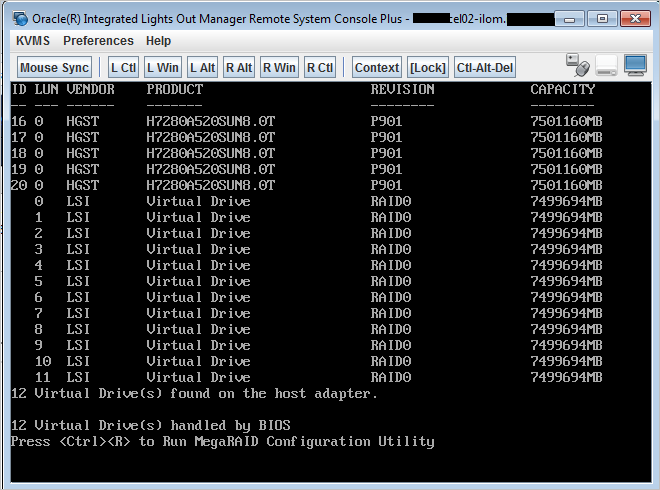
Immediately press Ctrl+S on keyboard

Select the "CELL_USB_BOOT_CELLBOOT_usb_in_rescue_mode

At the point, we will have continue the rescue process using serial ILOM

As root, ssh to the storage cell ILOM and start the serial console

Enter r and hit return

Enter y and hit return

Enter the rescue password sos1exadata. Enter n and hit return

Enter the root user password 

We are into the rescue mode. At this moment check to make sure that the there are no file system issue. Fix any other issue you may have. Consult Oracle if required

Reboot the server again to complete the rescue process

Hit return

The server is powered off

Power on the server using web ILOM as shown below

Rescue process is completed and we got the root login prompt


Login to the server as root user and perform the post rescue steps

Verify the image version of the storage cell

Post Storage Cell Rescue steps:
[root@dm01cel02 ~]# imageinfo
Kernel version: 4.1.12-94.8.4.el6uek.x86_64 #2 SMP Sat May 5 16:14:51 PDT 2018 x86_64
Cell version: OSS_18.1.7.0.0AUG_LINUX.X64_180821
Cell rpm version: cell-18.1.7.0.0_LINUX.X64_180821-1.x86_64
Active image version: 18.1.7.0.0.180821
Active image kernel version: 4.1.12-94.8.4.el6uek
Active image activated: 2019-03-17 03:27:41 -0500
Active image status: success
Active system partition on device: /dev/md5
Active software partition on device: /dev/md7
Cell boot usb partition: /dev/sdm1
Cell boot usb version: 18.1.7.0.0.180821
Inactive image version: undefined
Rollback to the inactive partitions: Impossible
CellCLI> import celldisk all force
No cell disks qualified for this import operation
CellCLI> list physicaldisk
12:0 PST0XV normal
12:1 PZNDSV normal
12:2 PT5Z4V normal
12:3 PU3XLV normal
12:4 PYAKLV normal
12:5 PV828V normal
12:6 PZE5NV normal
12:7 PYV0YV normal
12:8 PZKUXV normal
12:9 PYD86V normal
12:10 PZL15V normal
12:11 PZPLAV normal
FLASH_1_1 S2T7NCAHA00958 normal
FLASH_2_1 S2T7NCAHA00986 normal
FLASH_4_1 S2T7NCAHA00956 normal
FLASH_5_1 S2T7NCAHA00947 normal
CellCLI> list celldisk
CD_00_dm01cel02 normal
CD_01_dm01cel02 normal
CD_02_dm01cel02 normal
CD_03_dm01cel02 normal
CD_04_dm01cel02 normal
CD_05_dm01cel02 normal
CD_06_dm01cel02 normal
CD_07_dm01cel02 normal
CD_08_dm01cel02 normal
CD_09_dm01cel02 normal
CD_10_dm01cel02 normal
CD_11_dm01cel02 normal
FD_00_dm01cel02 normal
FD_01_dm01cel02 normal
FD_02_dm01cel02 normal
FD_03_dm01cel02 normal
CellCLI> list griddisk
DATA_DM01_CD_00_dm01cel02 active
DATA_DM01_CD_01_dm01cel02 active
DATA_DM01_CD_02_dm01cel02 active
DATA_DM01_CD_03_dm01cel02 active
DATA_DM01_CD_04_dm01cel02 active
DATA_DM01_CD_05_dm01cel02 active
DATA_DM01_CD_06_dm01cel02 active
DATA_DM01_CD_07_dm01cel02 active
DATA_DM01_CD_08_dm01cel02 active
DATA_DM01_CD_09_dm01cel02 active
DATA_DM01_CD_10_dm01cel02 active
DATA_DM01_CD_11_dm01cel02 active
DBFS_DG_CD_02_dm01cel02 active
DBFS_DG_CD_03_dm01cel02 active
DBFS_DG_CD_04_dm01cel02 active
DBFS_DG_CD_05_dm01cel02 active
DBFS_DG_CD_06_dm01cel02 active
DBFS_DG_CD_07_dm01cel02 active
DBFS_DG_CD_08_dm01cel02 active
DBFS_DG_CD_09_dm01cel02 active
DBFS_DG_CD_10_dm01cel02 active
DBFS_DG_CD_11_dm01cel02 active
RECO_DM01_CD_00_dm01cel02 active
RECO_DM01_CD_01_dm01cel02 active
RECO_DM01_CD_02_dm01cel02 active
RECO_DM01_CD_03_dm01cel02 active
RECO_DM01_CD_04_dm01cel02 active
RECO_DM01_CD_05_dm01cel02 active
RECO_DM01_CD_06_dm01cel02 active
RECO_DM01_CD_07_dm01cel02 active
RECO_DM01_CD_08_dm01cel02 active
RECO_DM01_CD_09_dm01cel02 active
RECO_DM01_CD_10_dm01cel02 active
RECO_DM01_CD_11_dm01cel02 active
[root@dm01cel02 ~]# cellcli -e list flashcache detail
name: dm01cel02_FLASHCACHE
cellDisk: FD_03_dm01cel02,FD_01_dm01cel02,FD_02_dm01cel02,FD_00_dm01cel02
creationTime: 2019-03-17T03:19:43-05:00
degradedCelldisks:
effectiveCacheSize: 11.64312744140625T
id: 574c3bd1-7a35-42ba-a03b-75f3a93edac7
size: 11.64312744140625T
status: normal
[root@dm01cel02 ~]# cellcli -e list flashlog detail
name: dm01cel02_FLASHLOG
cellDisk: FD_03_dm01cel02,FD_00_dm01cel02,FD_01_dm01cel02,FD_02_dm01cel02
creationTime: 2019-03-17T03:19:43-05:00
degradedCelldisks:
effectiveSize: 512M
efficiency: 100.0
id: 73cd8288-c6d8-42c3-95a1-97ce287cf7d0
size: 512M
status: normal
Kernel version: 4.1.12-94.8.4.el6uek.x86_64 #2 SMP Sat May 5 16:14:51 PDT 2018 x86_64
Cell version: OSS_18.1.7.0.0AUG_LINUX.X64_180821
Cell rpm version: cell-18.1.7.0.0_LINUX.X64_180821-1.x86_64
Active image version: 18.1.7.0.0.180821
Active image kernel version: 4.1.12-94.8.4.el6uek
Active image activated: 2019-03-17 03:27:41 -0500
Active image status: success
Active system partition on device: /dev/md5
Active software partition on device: /dev/md7
Cell boot usb partition: /dev/sdm1
Cell boot usb version: 18.1.7.0.0.180821
Inactive image version: undefined
Rollback to the inactive partitions: Impossible
CellCLI> import celldisk all force
No cell disks qualified for this import operation
CellCLI> list physicaldisk
12:0 PST0XV normal
12:1 PZNDSV normal
12:2 PT5Z4V normal
12:3 PU3XLV normal
12:4 PYAKLV normal
12:5 PV828V normal
12:6 PZE5NV normal
12:7 PYV0YV normal
12:8 PZKUXV normal
12:9 PYD86V normal
12:10 PZL15V normal
12:11 PZPLAV normal
FLASH_1_1 S2T7NCAHA00958 normal
FLASH_2_1 S2T7NCAHA00986 normal
FLASH_4_1 S2T7NCAHA00956 normal
FLASH_5_1 S2T7NCAHA00947 normal
CellCLI> list celldisk
CD_00_dm01cel02 normal
CD_01_dm01cel02 normal
CD_02_dm01cel02 normal
CD_03_dm01cel02 normal
CD_04_dm01cel02 normal
CD_05_dm01cel02 normal
CD_06_dm01cel02 normal
CD_07_dm01cel02 normal
CD_08_dm01cel02 normal
CD_09_dm01cel02 normal
CD_10_dm01cel02 normal
CD_11_dm01cel02 normal
FD_00_dm01cel02 normal
FD_01_dm01cel02 normal
FD_02_dm01cel02 normal
FD_03_dm01cel02 normal
CellCLI> list griddisk
DATA_DM01_CD_00_dm01cel02 active
DATA_DM01_CD_01_dm01cel02 active
DATA_DM01_CD_02_dm01cel02 active
DATA_DM01_CD_03_dm01cel02 active
DATA_DM01_CD_04_dm01cel02 active
DATA_DM01_CD_05_dm01cel02 active
DATA_DM01_CD_06_dm01cel02 active
DATA_DM01_CD_07_dm01cel02 active
DATA_DM01_CD_08_dm01cel02 active
DATA_DM01_CD_09_dm01cel02 active
DATA_DM01_CD_10_dm01cel02 active
DATA_DM01_CD_11_dm01cel02 active
DBFS_DG_CD_02_dm01cel02 active
DBFS_DG_CD_03_dm01cel02 active
DBFS_DG_CD_04_dm01cel02 active
DBFS_DG_CD_05_dm01cel02 active
DBFS_DG_CD_06_dm01cel02 active
DBFS_DG_CD_07_dm01cel02 active
DBFS_DG_CD_08_dm01cel02 active
DBFS_DG_CD_09_dm01cel02 active
DBFS_DG_CD_10_dm01cel02 active
DBFS_DG_CD_11_dm01cel02 active
RECO_DM01_CD_00_dm01cel02 active
RECO_DM01_CD_01_dm01cel02 active
RECO_DM01_CD_02_dm01cel02 active
RECO_DM01_CD_03_dm01cel02 active
RECO_DM01_CD_04_dm01cel02 active
RECO_DM01_CD_05_dm01cel02 active
RECO_DM01_CD_06_dm01cel02 active
RECO_DM01_CD_07_dm01cel02 active
RECO_DM01_CD_08_dm01cel02 active
RECO_DM01_CD_09_dm01cel02 active
RECO_DM01_CD_10_dm01cel02 active
RECO_DM01_CD_11_dm01cel02 active
[root@dm01cel02 ~]# cellcli -e list flashcache detail
name: dm01cel02_FLASHCACHE
cellDisk: FD_03_dm01cel02,FD_01_dm01cel02,FD_02_dm01cel02,FD_00_dm01cel02
creationTime: 2019-03-17T03:19:43-05:00
degradedCelldisks:
effectiveCacheSize: 11.64312744140625T
id: 574c3bd1-7a35-42ba-a03b-75f3a93edac7
size: 11.64312744140625T
status: normal
[root@dm01cel02 ~]# cellcli -e list flashlog detail
name: dm01cel02_FLASHLOG
cellDisk: FD_03_dm01cel02,FD_00_dm01cel02,FD_01_dm01cel02,FD_02_dm01cel02
creationTime: 2019-03-17T03:19:43-05:00
degradedCelldisks:
effectiveSize: 512M
efficiency: 100.0
id: 73cd8288-c6d8-42c3-95a1-97ce287cf7d0
size: 512M
status: normal
SQL> select a.name,b.path,b.state,b.mode_status,b.failgroup
from v$asm_diskgroup a, v$asm_disk b
where a.group_number=b.group_number
and b.failgroup='dm01cel02'
order by 2,1;
no rows selected
SQL> alter diskgroup DBFS_DG add disk 'o/192.168.1.1;192.168.1.2/DBFS_DG_*_dm01cel02' force;
Diskgroup altered.
from v$asm_diskgroup a, v$asm_disk b
where a.group_number=b.group_number
and b.failgroup='dm01cel02'
order by 2,1;
no rows selected
SQL> alter diskgroup DBFS_DG add disk 'o/192.168.1.1;192.168.1.2/DBFS_DG_*_dm01cel02' force;
Diskgroup altered.
SQL> alter diskgroup DATA_DM01 add disk 'o/192.168.1.1;192.168.1.2/DATA_DM01_*_dm01cel02' force;
Diskgroup altered.
Diskgroup altered.
SQL> alter diskgroup RECO_DM01 add disk 'o/192.168.1.1;192.168.1.2/RECO_DM01_*_dm01cel02' force;
Diskgroup altered.
Diskgroup altered.
SQL> select * from v$asm_operation;
GROUP_NUMBER OPERA STAT POWER ACTUAL SOFAR EST_WORK EST_RATE EST_MINUTES ERROR_CODE
------------ ----- ---- ---------- ---------- ---------- ---------- ---------- ----------- --------------------------------------------
1 REBAL RUN 4 4 204367 3521267 13041 254
3 REBAL WAIT 4
GROUP_NUMBER OPERA STAT POWER ACTUAL SOFAR EST_WORK EST_RATE EST_MINUTES ERROR_CODE
------------ ----- ---- ---------- ---------- ---------- ---------- ---------- ----------- --------------------------------------------
1 REBAL RUN 4 4 204367 3521267 13041 254
3 REBAL WAIT 4
SQL> select * from v$asm_operation;
no rows selected
SQL> col path for a70
SQL> set lines 200
SQL> set pages 200
SQL> select a.name,b.path,b.state,b.mode_status,b.failgroup
from v$asm_diskgroup a, v$asm_disk b
where a.group_number=b.group_number
and b.failgroup='dm01cel02'
order by 2,1; 2 3 4 5
NAME PATH STATE MODE_ST FAILGROUP
------------------------------ ---------------------------------------------------------------------- -------- ------- ------------------------------
DATA_DM01 o/192.168.1.1;192.168.1.2/DATA_DM01_CD_00_dm01cel02 NORMAL ONLINE dm01cel02
DATA_DM01 o/192.168.1.1;192.168.1.2/DATA_DM01_CD_01_dm01cel02 NORMAL ONLINE dm01cel02
DATA_DM01 o/192.168.1.1;192.168.1.2/DATA_DM01_CD_02_dm01cel02 NORMAL ONLINE dm01cel02
DATA_DM01 o/192.168.1.1;192.168.1.2/DATA_DM01_CD_03_dm01cel02 NORMAL ONLINE dm01cel02
DATA_DM01 o/192.168.1.1;192.168.1.2/DATA_DM01_CD_04_dm01cel02 NORMAL ONLINE dm01cel02
DATA_DM01 o/192.168.1.1;192.168.1.2/DATA_DM01_CD_05_dm01cel02 NORMAL ONLINE dm01cel02
DATA_DM01 o/192.168.1.1;192.168.1.2/DATA_DM01_CD_06_dm01cel02 NORMAL ONLINE dm01cel02
DATA_DM01 o/192.168.1.1;192.168.1.2/DATA_DM01_CD_07_dm01cel02 NORMAL ONLINE dm01cel02
DATA_DM01 o/192.168.1.1;192.168.1.2/DATA_DM01_CD_08_dm01cel02 NORMAL ONLINE dm01cel02
DATA_DM01 o/192.168.1.1;192.168.1.2/DATA_DM01_CD_09_dm01cel02 NORMAL ONLINE dm01cel02
DATA_DM01 o/192.168.1.1;192.168.1.2/DATA_DM01_CD_10_dm01cel02 NORMAL ONLINE dm01cel02
DATA_DM01 o/192.168.1.1;192.168.1.2/DATA_DM01_CD_11_dm01cel02 NORMAL ONLINE dm01cel02
DBFS_DG o/192.168.1.1;192.168.1.2/DBFS_DG_CD_02_dm01cel02 NORMAL ONLINE dm01cel02
DBFS_DG o/192.168.1.1;192.168.1.2/DBFS_DG_CD_03_dm01cel02 NORMAL ONLINE dm01cel02
DBFS_DG o/192.168.1.1;192.168.1.2/DBFS_DG_CD_04_dm01cel02 NORMAL ONLINE dm01cel02
DBFS_DG o/192.168.1.1;192.168.1.2/DBFS_DG_CD_05_dm01cel02 NORMAL ONLINE dm01cel02
DBFS_DG o/192.168.1.1;192.168.1.2/DBFS_DG_CD_06_dm01cel02 NORMAL ONLINE dm01cel02
DBFS_DG o/192.168.1.1;192.168.1.2/DBFS_DG_CD_07_dm01cel02 NORMAL ONLINE dm01cel02
DBFS_DG o/192.168.1.1;192.168.1.2/DBFS_DG_CD_08_dm01cel02 NORMAL ONLINE dm01cel02
DBFS_DG o/192.168.1.1;192.168.1.2/DBFS_DG_CD_09_dm01cel02 NORMAL ONLINE dm01cel02
DBFS_DG o/192.168.1.1;192.168.1.2/DBFS_DG_CD_10_dm01cel02 NORMAL ONLINE dm01cel02
DBFS_DG o/192.168.1.1;192.168.1.2/DBFS_DG_CD_11_dm01cel02 NORMAL ONLINE dm01cel02
RECO_DM01 o/192.168.1.1;192.168.1.2/RECO_DM01_CD_00_dm01cel02 NORMAL ONLINE dm01cel02
RECO_DM01 o/192.168.1.1;192.168.1.2/RECO_DM01_CD_01_dm01cel02 NORMAL ONLINE dm01cel02
RECO_DM01 o/192.168.1.1;192.168.1.2/RECO_DM01_CD_02_dm01cel02 NORMAL ONLINE dm01cel02
RECO_DM01 o/192.168.1.1;192.168.1.2/RECO_DM01_CD_03_dm01cel02 NORMAL ONLINE dm01cel02
RECO_DM01 o/192.168.1.1;192.168.1.2/RECO_DM01_CD_04_dm01cel02 NORMAL ONLINE dm01cel02
RECO_DM01 o/192.168.1.1;192.168.1.2/RECO_DM01_CD_05_dm01cel02 NORMAL ONLINE dm01cel02
RECO_DM01 o/192.168.1.1;192.168.1.2/RECO_DM01_CD_06_dm01cel02 NORMAL ONLINE dm01cel02
RECO_DM01 o/192.168.1.1;192.168.1.2/RECO_DM01_CD_07_dm01cel02 NORMAL ONLINE dm01cel02
RECO_DM01 o/192.168.1.1;192.168.1.2/RECO_DM01_CD_08_dm01cel02 NORMAL ONLINE dm01cel02
RECO_DM01 o/192.168.1.1;192.168.1.2/RECO_DM01_CD_09_dm01cel02 NORMAL ONLINE dm01cel02
RECO_DM01 o/192.168.1.1;192.168.1.2/RECO_DM01_CD_10_dm01cel02 NORMAL ONLINE dm01cel02
RECO_DM01 o/192.168.1.1;192.168.1.2/RECO_DM01_CD_11_dm01cel02 NORMAL ONLINE dm01cel02
34 rows selected.
no rows selected
SQL> col path for a70
SQL> set lines 200
SQL> set pages 200
SQL> select a.name,b.path,b.state,b.mode_status,b.failgroup
from v$asm_diskgroup a, v$asm_disk b
where a.group_number=b.group_number
and b.failgroup='dm01cel02'
order by 2,1; 2 3 4 5
NAME PATH STATE MODE_ST FAILGROUP
------------------------------ ---------------------------------------------------------------------- -------- ------- ------------------------------
DATA_DM01 o/192.168.1.1;192.168.1.2/DATA_DM01_CD_00_dm01cel02 NORMAL ONLINE dm01cel02
DATA_DM01 o/192.168.1.1;192.168.1.2/DATA_DM01_CD_01_dm01cel02 NORMAL ONLINE dm01cel02
DATA_DM01 o/192.168.1.1;192.168.1.2/DATA_DM01_CD_02_dm01cel02 NORMAL ONLINE dm01cel02
DATA_DM01 o/192.168.1.1;192.168.1.2/DATA_DM01_CD_03_dm01cel02 NORMAL ONLINE dm01cel02
DATA_DM01 o/192.168.1.1;192.168.1.2/DATA_DM01_CD_04_dm01cel02 NORMAL ONLINE dm01cel02
DATA_DM01 o/192.168.1.1;192.168.1.2/DATA_DM01_CD_05_dm01cel02 NORMAL ONLINE dm01cel02
DATA_DM01 o/192.168.1.1;192.168.1.2/DATA_DM01_CD_06_dm01cel02 NORMAL ONLINE dm01cel02
DATA_DM01 o/192.168.1.1;192.168.1.2/DATA_DM01_CD_07_dm01cel02 NORMAL ONLINE dm01cel02
DATA_DM01 o/192.168.1.1;192.168.1.2/DATA_DM01_CD_08_dm01cel02 NORMAL ONLINE dm01cel02
DATA_DM01 o/192.168.1.1;192.168.1.2/DATA_DM01_CD_09_dm01cel02 NORMAL ONLINE dm01cel02
DATA_DM01 o/192.168.1.1;192.168.1.2/DATA_DM01_CD_10_dm01cel02 NORMAL ONLINE dm01cel02
DATA_DM01 o/192.168.1.1;192.168.1.2/DATA_DM01_CD_11_dm01cel02 NORMAL ONLINE dm01cel02
DBFS_DG o/192.168.1.1;192.168.1.2/DBFS_DG_CD_02_dm01cel02 NORMAL ONLINE dm01cel02
DBFS_DG o/192.168.1.1;192.168.1.2/DBFS_DG_CD_03_dm01cel02 NORMAL ONLINE dm01cel02
DBFS_DG o/192.168.1.1;192.168.1.2/DBFS_DG_CD_04_dm01cel02 NORMAL ONLINE dm01cel02
DBFS_DG o/192.168.1.1;192.168.1.2/DBFS_DG_CD_05_dm01cel02 NORMAL ONLINE dm01cel02
DBFS_DG o/192.168.1.1;192.168.1.2/DBFS_DG_CD_06_dm01cel02 NORMAL ONLINE dm01cel02
DBFS_DG o/192.168.1.1;192.168.1.2/DBFS_DG_CD_07_dm01cel02 NORMAL ONLINE dm01cel02
DBFS_DG o/192.168.1.1;192.168.1.2/DBFS_DG_CD_08_dm01cel02 NORMAL ONLINE dm01cel02
DBFS_DG o/192.168.1.1;192.168.1.2/DBFS_DG_CD_09_dm01cel02 NORMAL ONLINE dm01cel02
DBFS_DG o/192.168.1.1;192.168.1.2/DBFS_DG_CD_10_dm01cel02 NORMAL ONLINE dm01cel02
DBFS_DG o/192.168.1.1;192.168.1.2/DBFS_DG_CD_11_dm01cel02 NORMAL ONLINE dm01cel02
RECO_DM01 o/192.168.1.1;192.168.1.2/RECO_DM01_CD_00_dm01cel02 NORMAL ONLINE dm01cel02
RECO_DM01 o/192.168.1.1;192.168.1.2/RECO_DM01_CD_01_dm01cel02 NORMAL ONLINE dm01cel02
RECO_DM01 o/192.168.1.1;192.168.1.2/RECO_DM01_CD_02_dm01cel02 NORMAL ONLINE dm01cel02
RECO_DM01 o/192.168.1.1;192.168.1.2/RECO_DM01_CD_03_dm01cel02 NORMAL ONLINE dm01cel02
RECO_DM01 o/192.168.1.1;192.168.1.2/RECO_DM01_CD_04_dm01cel02 NORMAL ONLINE dm01cel02
RECO_DM01 o/192.168.1.1;192.168.1.2/RECO_DM01_CD_05_dm01cel02 NORMAL ONLINE dm01cel02
RECO_DM01 o/192.168.1.1;192.168.1.2/RECO_DM01_CD_06_dm01cel02 NORMAL ONLINE dm01cel02
RECO_DM01 o/192.168.1.1;192.168.1.2/RECO_DM01_CD_07_dm01cel02 NORMAL ONLINE dm01cel02
RECO_DM01 o/192.168.1.1;192.168.1.2/RECO_DM01_CD_08_dm01cel02 NORMAL ONLINE dm01cel02
RECO_DM01 o/192.168.1.1;192.168.1.2/RECO_DM01_CD_09_dm01cel02 NORMAL ONLINE dm01cel02
RECO_DM01 o/192.168.1.1;192.168.1.2/RECO_DM01_CD_10_dm01cel02 NORMAL ONLINE dm01cel02
RECO_DM01 o/192.168.1.1;192.168.1.2/RECO_DM01_CD_11_dm01cel02 NORMAL ONLINE dm01cel02
34 rows selected.
Conclusion
In this article we have demonstrated step by step procedure to perform Storage Cell Rescue. You may have to perform the Storage cell rescue for multiple reasons such as root file system corrupted, Kernel panic, server rebooting continuously and so on. With the help of CELLBOOT usb one can perform the storage cell rescue very easily.


